
Turn an SOP into a training video
Upload a handbook, policy, or deck. Knowlify writes the script, animates the scenes, and narrates the module.
Across 200,000+ animated explainer videos produced on Knowlify, teams that start from a structured document (not a blank timeline) typically finish a publishable first draft in under 10 minutes.
Made with Knowlify
Real training videos created from a doc or a prompt
Adidas - Employee Onboarding (Health & Safety)
Coinbase - Financial Report Explainer
Public Health - COVID Vaccines Explainer
Non-Profit - Explainer Video
See it in action
Watch the AI training video workflow
The AI training video maker built for L&D
Skip the scripts, shoots, and weeks of agency back-and-forth. Turn the manuals and policies you already maintain into finished, on-brand training video, free to start.
SOP and PDF to video
Upload manuals, SOPs, PowerPoints, or policy docs and get a narrated training video, with no rewriting and no manual storyboarding.
Update without reshoots
Policies change. Edit a sentence or drop in a revised doc, then re-render in minutes instead of booking another production cycle.
Real animation for learning
Knowlify generates animated scenes that teach the concept, not a single talking head reading slides or stock clips over text.
LMS-ready exports
Export polished MP4s your team can drop into any LMS, intranet, or SCORM package, then keep the library current as docs change.
Training that works
Videos for every learning job
Learning & development
Replace dense PDFs and slide decks with short, engaging modules learners actually finish.
Learn more →Compliance & information security
Turn policy updates into watchable training without waiting on a third-party producer.
Learn more →Sales enablement
Ship product and process training your sellers will not skip, updated every release cycle.
Learn more →Safety & operations
Convert SOPs and machine procedures into clear animated walkthroughs for the floor.
Learn more →Customer training
Turn help articles and product guides into short videos that cut support tickets.
Learn more →How to make a training video
From a document to LMS-ready video, automatically
Upload a training doc or type a prompt
Drop in an SOP, PDF, slide deck, handbook, or compliance policy, or describe the training module you need. The AI training video maker reads your source material and keeps the facts intact.
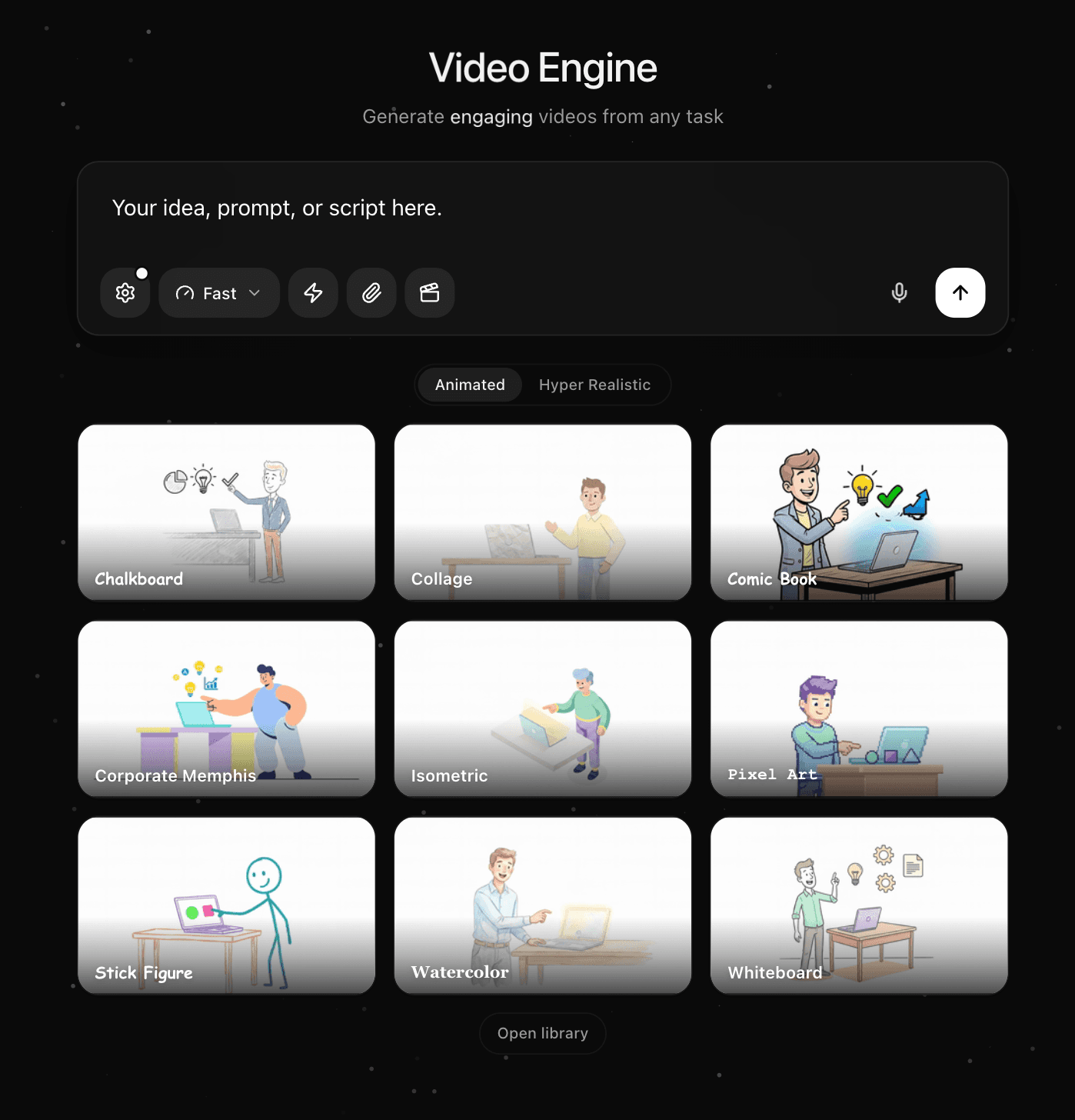
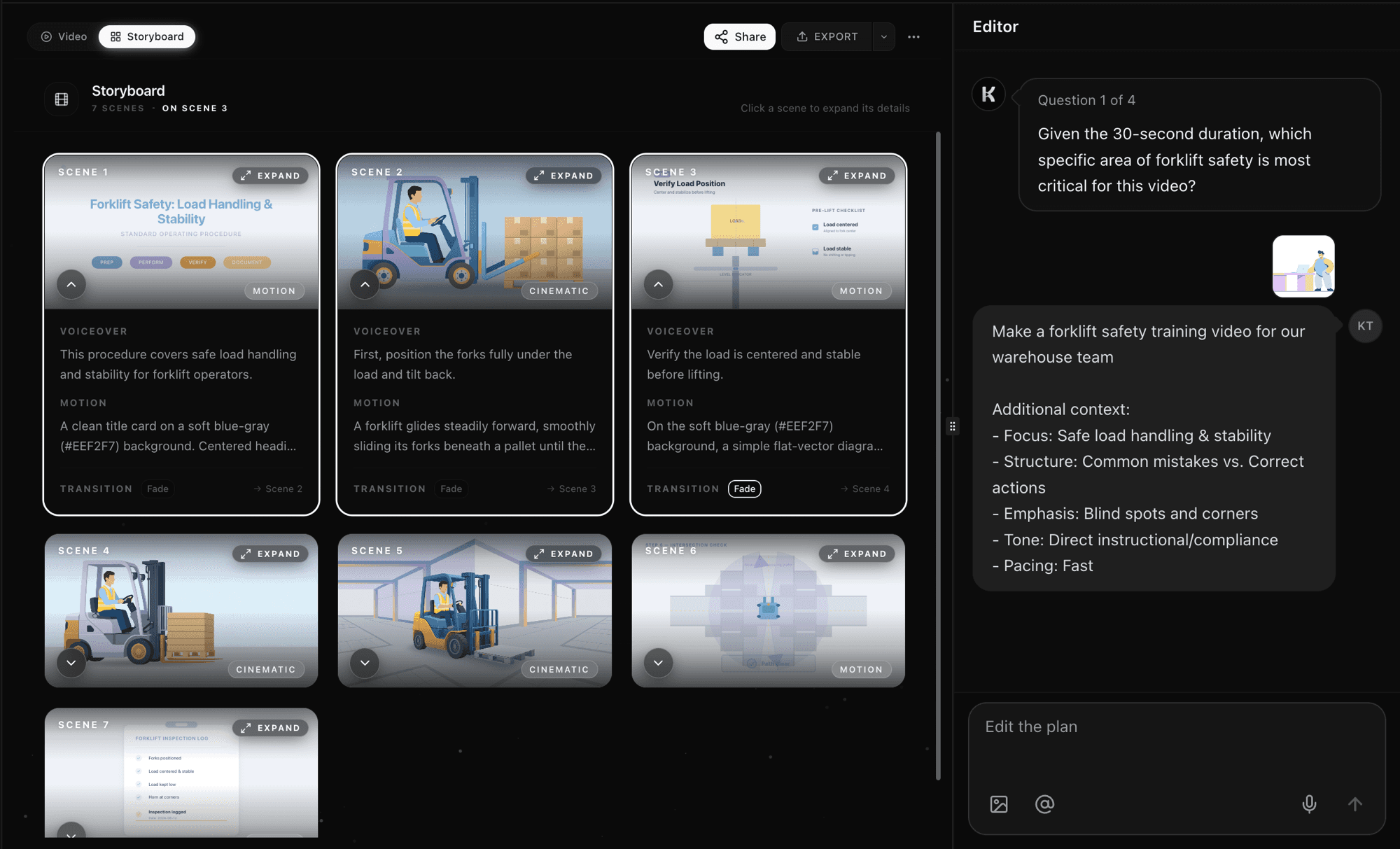
AI scripts, storyboards, and narrates every scene
Knowlify writes a clear learning script, builds a scene-by-scene storyboard, generates voiceover, and animates each beat. No timeline, no keyframes, no studio shoot.
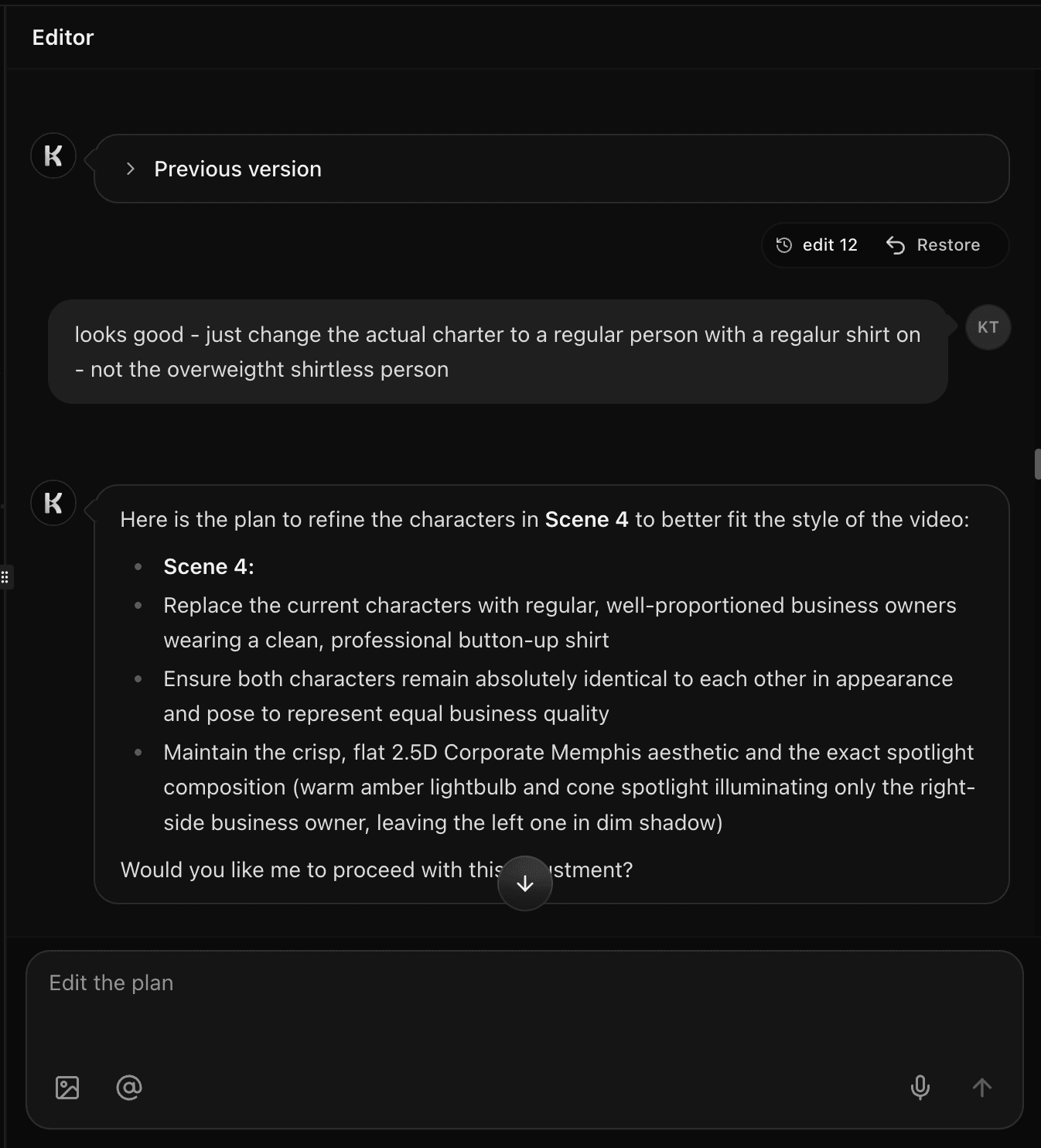
Edit in plain English and export to your LMS
Refine any scene by chatting with the AI, swap style or voice, apply your brand, then export a polished training video ready for your LMS, intranet, or live session.
Inside the studio
Everything you need to make training videos
See and control every training scene
Every video opens in a scene-by-scene storyboard. Read the voiceover, preview the first frame, and tune the motion for each shot. Reorder sections, tighten wording, and preview the full module before you render so L&D keeps full instructional control.
Comparison
Knowlify vs other training video tools
How the Knowlify AI training video maker compares to popular alternatives like Synthesia, Vyond, Articulate, Camtasia, Powtoon, and HeyGen.
| Feature | Knowlify | Synthesia | Vyond | Articulate | Camtasia | Powtoon | HeyGen |
|---|---|---|---|---|---|---|---|
| Doc / SOP / PDF to training video | Yes, native | Limited | No | No | No | No | Limited |
| Animated scenes (not just avatar + slides) | Yes | Avatar-first | Template | Authoring shell | Screen record | Template | Avatar-first |
| Update video when source docs change | Minutes | Yes | Manual | Manual | Reshoot | Manual | Yes |
| Edit by chatting in plain English | Yes | No | No | No | No | No | No |
| Custom digital twin presenter | Yes | Yes | No | No | No | No | Yes |
| Voice cloning | Yes | Yes | No | No | No | No | Yes |
| 40+ animation styles | Yes | No | Limited | No | No | Limited | No |
| LMS / SCORM-friendly export | MP4 ready | Yes | Yes | Native SCORM | Yes | Yes | Yes |
| Time to first training video | Minutes | Minutes | Hours | Days | Hours | Hours | Minutes |
Comparison based on publicly available product information and typical workflows. Features change frequently.
Recognized by

Related guides
AI course video maker
Lesson plans, notes, and outlines into course-video libraries.
Lesson plan to video
Turn objectives and activities into one focused lesson.
Best AI training video generators (2026)
Compare Knowlify, Synthesia, Vyond, and more.
HIPAA training video maker
Privacy policies to HIPAA workforce training video.
OSHA compliance video maker
Safety manuals to OSHA training video.
Compliance training videos
Policy docs to OSHA, HIPAA, and SOC2 video.
Workplace safety training videos
EHS SOPs to safety training video.
FAQ
Training video maker questions
What is an AI training video maker?+
An AI training video maker turns training documents or prompts into a narrated, animated learning video automatically. With Knowlify, you upload an SOP, PDF, slide deck, or handbook and the AI writes the script, builds a scene-by-scene storyboard, generates voiceover, and animates the scenes. No editing software, designers, or production crew required.
Is the AI training video maker free?+
Book a demo to see Knowlify with your content and discuss access and pricing for your team.
How do I make my own training video?+
Three steps: (1) upload an SOP, PDF, PowerPoint, or handbook, or describe the module; (2) the AI generates a clear learning script and storyboard; (3) edit any scene, choose a style and voice, apply your brand, and export to your LMS. Most training videos are ready in minutes.
How much does it cost to make a training video?+
Traditional production often runs thousands of dollars per minute and days or weeks of turnaround. With Knowlify you can produce professional training videos in minutes from the documents you already have, so cost per module drops dramatically versus agencies or in-house shoots.
How should I structure training videos?+
Start with clear learning objectives, break content into short logical sections, use visuals and examples for each concept, and end with a recap plus a next action. Knowlify turns your source doc into scene-by-scene structure automatically, then you refine in the storyboard.
What is the difference between an instructional video and a training video?+
An instructional video is usually a short, task-focused how-to. A training video is broader: skills, knowledge, or behaviors with objectives, explanation, and practice. Knowlify supports both, from single-task walkthroughs to full compliance and onboarding modules.
How is Knowlify different from Synthesia or Vyond for training?+
Synthesia is avatar-first and Vyond is a manual template editor. Knowlify is built around turning your training documents into fully animated, on-brand scenes, with optional AI avatars, voice cloning, a 40+ style library, brand kit, and edits by chatting in plain English. It is the fastest path from SOP to LMS-ready video.
What can I upload to create a training video?+
PDFs, Word docs, Google Docs, PowerPoints, SOPs, handbooks, compliance policies, outlines, and plain text. The AI reads your content and turns it into a structured training video with a scene for each key idea.
Can I update training videos when policies change?+
Yes. Edit the script, upload a revised document, or chat with the AI ("update scene 3 for the new policy"), then re-render. You keep the library current without reshooting or rebuilding timelines.
What are the benefits of online training video vs in-person training?+
Online training video is flexible, consistent across locations, cheaper to scale, and easy to track in an LMS. In-person still helps for hands-on practice. Most teams use Knowlify video for the knowledge layer and reserving live time for coaching and drills.
Can I use the videos commercially or inside my LMS?+
Yes. Videos you create are yours to use across employee training, compliance, onboarding, partner enablement, and customer education. Export MP4 and drop it into any LMS or intranet.
What is the best free training video maker?+
If you need narrated, animated training from documents without a production team, Knowlify is built as a free-to-start AI training video maker: script, storyboard, voice, and motion in one flow. Compare options in our best AI training video generators guide.
Make your first AI training video
Upload an SOP, PDF, or deck and get a narrated, animated training video in minutes.